
The NIOS Dashboard is an online portal where you can check your course details.
After logging in, you can check your admission status, payment history, ID card, and many more.
In this guide, you will learn what the NIOS Dashboard is, how to log in, what services are available.
What is the NIOS Dashboard?
The NIOS Dashboard is an online student portal where students can access different academic related services in one place.
You can check your application and payment status, download your ID card, access study material, check PCP schedules, and use other NIOS e-services.
Official NIOS Student Portal: https://sdmis.nios.ac.in.
NIOS student portal overview
The services available on the dashboard may vary depending on your course, admission status and the options currently provided by NIOS.
| Service | What You Can Do |
|---|---|
| Admission Status | Check application and admission status |
| Id card | Download and print your NIOS ID card |
| Student details | Check enrolment number and other details |
| Result | Check Public and On-Demand Examination results |
| Assignment | Upload TMA and check assignment status |
| Study Material | Access study material and related resources |
| PCP classes | Check PCP schedule and related information |
| Examination | Check available examination-related information |
| E-Services | Apply for available online services |
How to Create a Class 12 NIOS Dashboard Using Your Existing Login
When you applied for fresh admission in Class 10? At that time, you had to create a login account. After that, you could access your student dashboard.
If you have passed Class 10 from NIOS, you do not need to create a separate login account for Class 12.
You can create your Class 12 dashboard with just a few clicks.
Simply click on the “Apply for Senior Secondary” option, fill in your details, upload the required documents, and make the fee payment.
Once the process is completed, your dashboard will be ready. You can use the same dashboard to check your Class 10 and Class 12 details.
You just need to click on the “go to Senior Secondary” or “go to Secondary” option shown at the top to switch between the two.
How to Login to NIOS Student Dashboard
To access your NIOS student dashboard, visit the SDMIS portal and log in using your details.
After successful login, you can see the services available for your account. The dashboard options may be different for each student depending on their admission type.
Fresh learner, need to create a login ID and complete the NIOS admission process.
Official NIOS Student Portal:
https://sdmis.nios.ac.in
- Visit the official SDMIS student portal.
- Enter your login details.
- Complete the required verification.
- Click Login.
- After successful login, your dashboard will appear.
NIOS Dashboard Features and Services
This sample image shows how the student dashboard actually looks when your login account created.
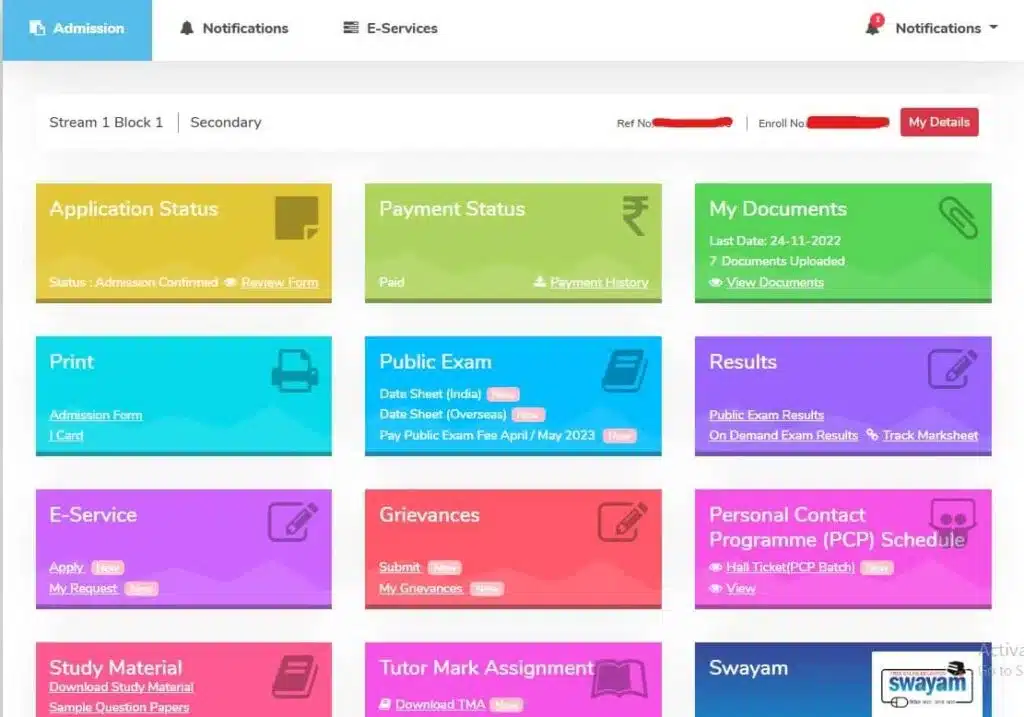
The following are some of the main services that students can access through the dashboard.
Application Status
You can check the updates about your application status. Once you’ve submitted your application, you can track its status.
You’ll find all updates here about NIOS admission status, document verification progress, approved, or document required.
Payment Status
The NIOS student login portal provides an easy-to-use payment tracking feature. You can check your payment details or payment history from the dashboard.
My Documents
Your uploaded documents will show here, including:
Photo
Signature
Address proof and many more
In this section you can find your NIOS ID card download option.
On Demand Exam Dates
If you are eligible for or have applied for the ODES Examination, related options may be available in your NIOS dashboard.
You may be able to:
- Check available exam dates
- Confirm or book an exam seat
- Re-book a seat, where applicable
- Download the On-Demand Examination hall ticket
The exact options shown can depend on your examination status and the current NIOS portal system.
Results
Here, you will get two options: Public Exam Results and On Demand Results.
E-Service
NIOS login portal offers e-services option to update their academic records , from adding subjects to changing subjects, where applicable..
You can also request a duplicate marksheet from e-service.
Grievances
If you find any issues the “Grievances” feature allows you to file complaints or raise queries.
You can track the status of your grievance.
Personal Contact Programme Schedule
Here, you can check the PCP class schedule for your course and download the PCP hall ticket.
The PCP classes are conducted twice a year for April and October session.
Study Material
In this section, you will find various options:
Download Study Material
Sample Question Papers
Book Price List
Submit Book Received Response.
Tutor Mark Assignment
Download TMA New
You can get the latest assignment question paper by clicking on the link.
Upload TMA New
Here, you can upload your assignment in a PDF file
TMA Status After submitting the assignment, you can check your status/ marks.
FAQ
Conclusion
The NIOS Dashboard is an important online platform for students after completing the admission process.
It lets you explore many useful services in a single place, including:
Admission status
Payment history
ID card
TMA and many more.
Regularly check your dashboard and stay updated about important academic and examination-related information.
Always use the https://sdmis.nios.ac.in for login.
Ansari Sir is an experienced education professional with over 20 years of expertise in distance and open education systems. He holds a Post-Graduation in Distance Education and has helped thousands of students. He is also an Empaneled Career Counsellor with the National Career Service (NCS), Government of India, and provides trusted, experience-based guidance for students.